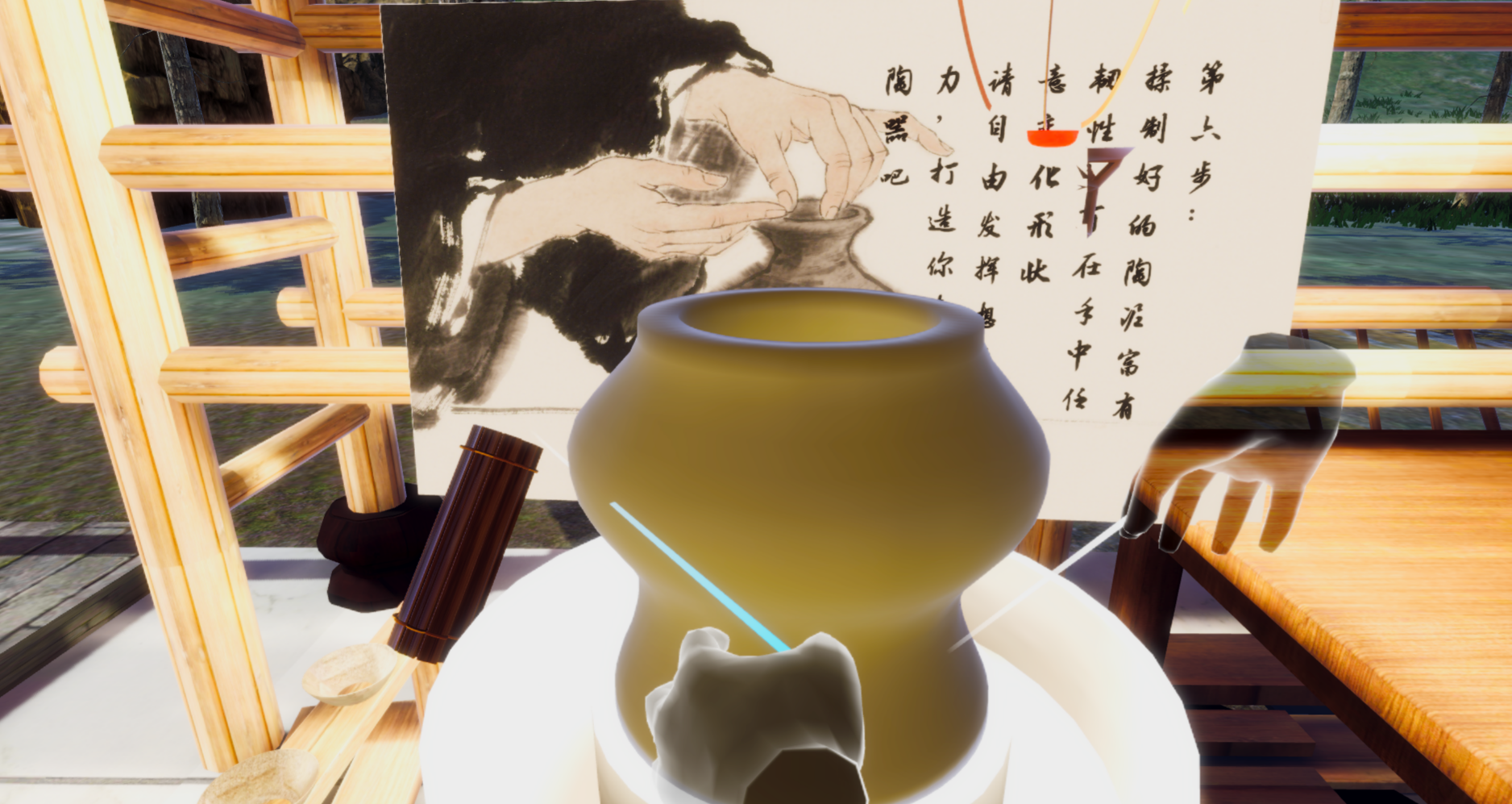
人机交互项目——VR陶艺全流程模拟
2025, Jun 12
Unity+XR+Pico,实现从制作陶土到绘制图案的陶艺全流程
项目简介
基于Unity 2022与Pico VR开发的沉浸式陶艺制作全流程模拟系统,旨在利用虚拟现实技术还原传统陶瓷制作工艺(从采水、和泥到塑形、彩绘)。
博主主要负责程序化网格生成、陶土模型塑形及绘制等功能的实现,以及和队友一起调试功能。
1. 程序化网格生成
- 自然塑形手感优化:
- 通过对陶罐半径和高度的硬性限制,防止模型被无限拉伸或内推导致破损或不合理形态。
- 底部变形优化:引入底部影响衰减机制’bottomInfluenceHeightPercentage’,避免过度变形和模型破损。
- 引入余弦衰减函数,使塑形操作对周围顶点的影响更加平滑自然,避免尖锐形变,更贴近真实陶泥的物理特性。
余弦衰减函数: \(f(d) = \cos\left(\frac{d}{R} \cdot \frac{\pi}{2}\right)\) 其中 $d$ 为顶点距离,$R$ 为影响半径。
for (int i = 0; i < currentVertices.Length; i++)
        {
            Vector3 vertexLocalPos = currentVertices[i];
            Vector3 vertexWorldPos = transform.TransformPoint(vertexLocalPos);

            // 检查顶点是否在影响的高度范围内
            float heightDiff = Mathf.Abs(vertexWorldPos.y - hitPoint.y);
            if (heightDiff > maxInfluenceHeightDiff)
            {
                continue; // 不在影响高度范围内,跳过
            }

            // 让底部附近的形变效果减弱
            float bottomInfluenceReduction = 1.0f;
            if (vertexLocalPos.y < bottomDeadZoneHeight) // 如果顶点在底部死区内
            {
                // 越接近底部,形变强度越小
                bottomInfluenceReduction = Mathf.InverseLerp(minOverallHeightLimit, bottomDeadZoneHeight, vertexLocalPos.y);
            }

            float distanceToHitPoint = Vector3.Distance(vertexWorldPos, hitPoint);

            if (distanceToHitPoint < sculptRadius)
            {
                float normalizedDistance = distanceToHitPoint / sculptRadius;
                float falloff = Mathf.Cos((normalizedDistance * Mathf.PI) / 2);

                Vector3 sculptDirectionLocal = new Vector3(vertexLocalPos.x, 0, vertexLocalPos.z).normalized;
                if (!isPush)
                {
                    sculptDirectionLocal = -sculptDirectionLocal;
                }

                // 综合考虑底部影响衰减
                Vector3 deformation = sculptDirectionLocal * sculptStrength * falloff * bottomInfluenceReduction; // <-- 应用底部衰减

                Vector3 newVertexLocal = vertexLocalPos + deformation;

                currentVertices[i] = newVertexLocal;
            }
        }
- 接缝连续性优化:通过共享顶点法线,解决了网格在生成和塑形过程中出现的垂直接缝问题,保证陶罐表面平滑。
2. VR 绘制与 RenderTexture 映射
- 实时笔触渲染:将用户的绘制操作实时映射到陶罐的
RenderTexture上。
void PaintAtPixel(int px, int py, Color color, float size)
    {
        RenderTexture currentActive = RenderTexture.active;
        RenderTexture.active = paintTexture;

        paintMaterial.color = color;

        // 确保坐标在纹理范围内
        px = Mathf.Clamp(px, 0, textureResolution - 1);
        py = Mathf.Clamp(py, 0, textureResolution - 1);

        int brushSizePixels = Mathf.Max(1, (int)(size * textureResolution));

        Rect brushRect = new Rect(
            px - brushSizePixels / 2f,
            py - brushSizePixels / 2f,
            brushSizePixels,
            brushSizePixels
        );

        GL.PushMatrix();
        GL.LoadPixelMatrix(0, textureResolution, textureResolution, 0);

        Graphics.DrawTexture(brushRect, Texture2D.whiteTexture, paintMaterial);

        GL.PopMatrix();

        RenderTexture.active = currentActive;
        paintTexture.GenerateMips();
    }
3. 游戏状态管理
- 核心状态机: 维护游戏流程中的不同状态(MainMenu, Sculpting, Painting, Finished)并进行平滑切换。 严格控制 PotteryMeshGenerator, PotteryPainter, PotteryRotator 等关键脚本的 enabled 状态,确保每个阶段只有所需功能激活。
开发环境
- 硬件:PICO VR3 / RTX 4060
- 软件:Unity 2022 + XR Interaction Toolkit
- 测试:XR Device Simulator Variant
- GitHub 源码:查看 VR-Pottery 工程